Personal work operating system

Your work finally
works together.

CoreWorkSuite brings your goals, plans, notes, email, and code into one calm workspace, with an AI companion that plans your morning, protects your focus, and closes your day.

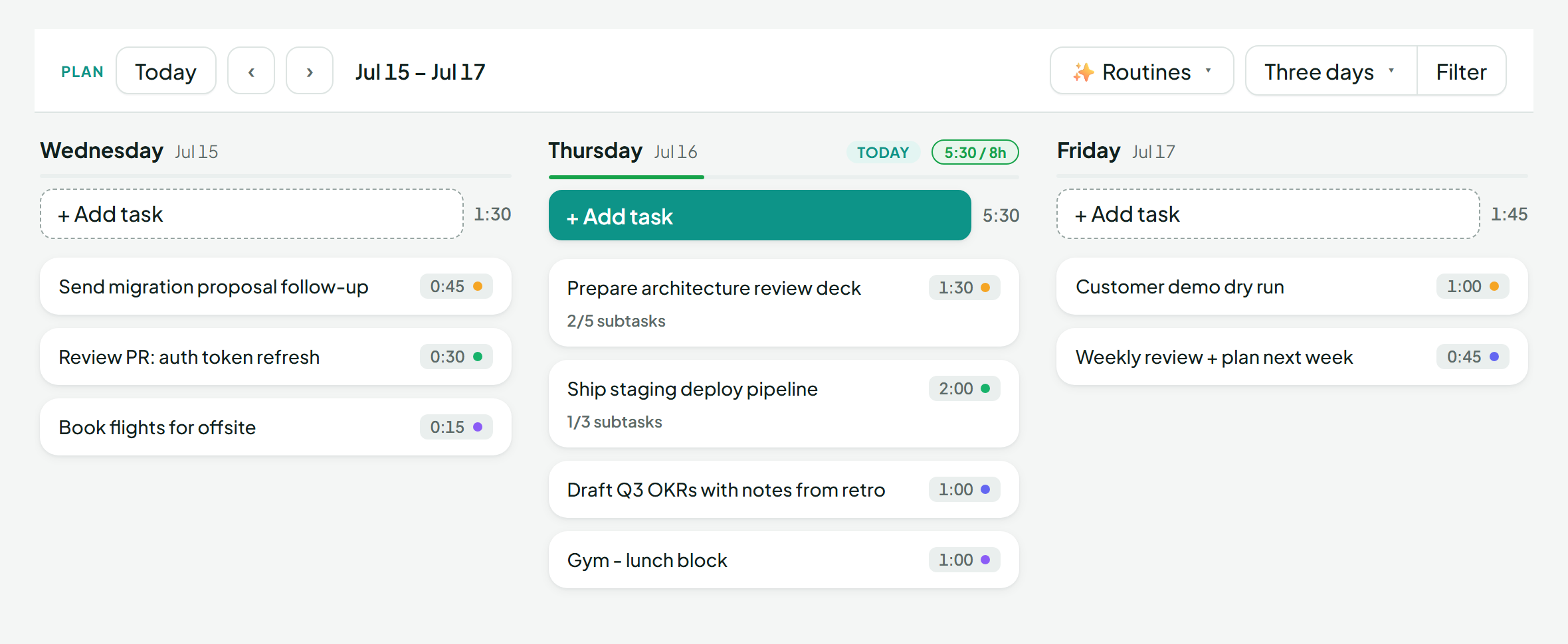
The CoreWorkSuite planner: a three-day board with tasks, time estimates, a workload meter reading 5:30 of 8h, and an AI Routines menu.
The problem

Your work lives in six places.
Your attention pays for it.

Goals in one app. Today's plan in another. Notes in a third. The actual work arrives in Gmail and GitHub, and your calendar belongs to everyone else. Nothing talks to anything, so you become the integration.

Email
Calendar
GitHub
Notes
Goals
Tasks
One workspace. Everything already connected.
The transformation

From scattered to calm.

Before

  • Six tools, none of them talking
  • Context switching all day
  • Priorities forgotten by Thursday
  • Reactive work, driven by the inbox

After

  • One workspace with everything in reach
  • Clear priorities, drafted every morning
  • Focus protected on the calendar
  • Calm execution and honest reviews
How it works

A day inside CoreWorkSuite

Plan

Wake up to a day already drafted

Every morning, on your schedule and in your timezone, Companion drafts a plan from your tasks, goals, and calendar: what to do, when, and why.

You review, adjust, and apply. The blank page never happens.
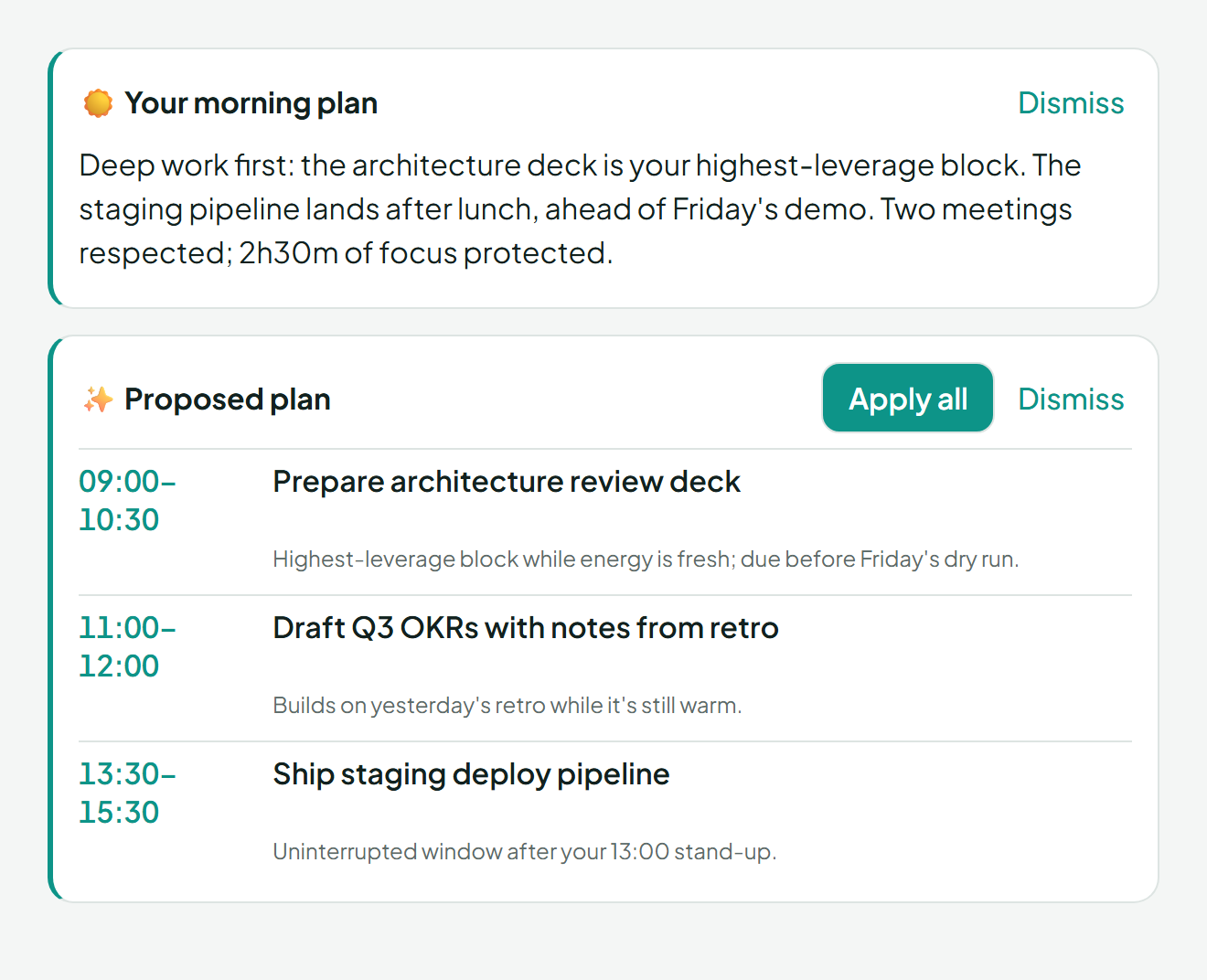
The morning plan: an AI summary plus a proposed schedule of time blocks, each with a reason, and an Apply all button.
Focus

One thing at a time, on purpose

Time-box tasks onto your day, start a focus timer, and watch planned versus actual. A workload meter keeps today honest against the hours you actually have.

Overcommitting stops being invisible.

Prepare architecture review deck 0:42:10 / 1:30:00 ◼ Stop 5:30 / 8h planned today
Connect

Work arrives where you plan it

Your Gmail inbox and your GitHub issues and pull requests live beside the plan. Star an email and it becomes a task. Drag an issue into today. Triage without ten open tabs.

The inputs come to the plan, not the other way around.
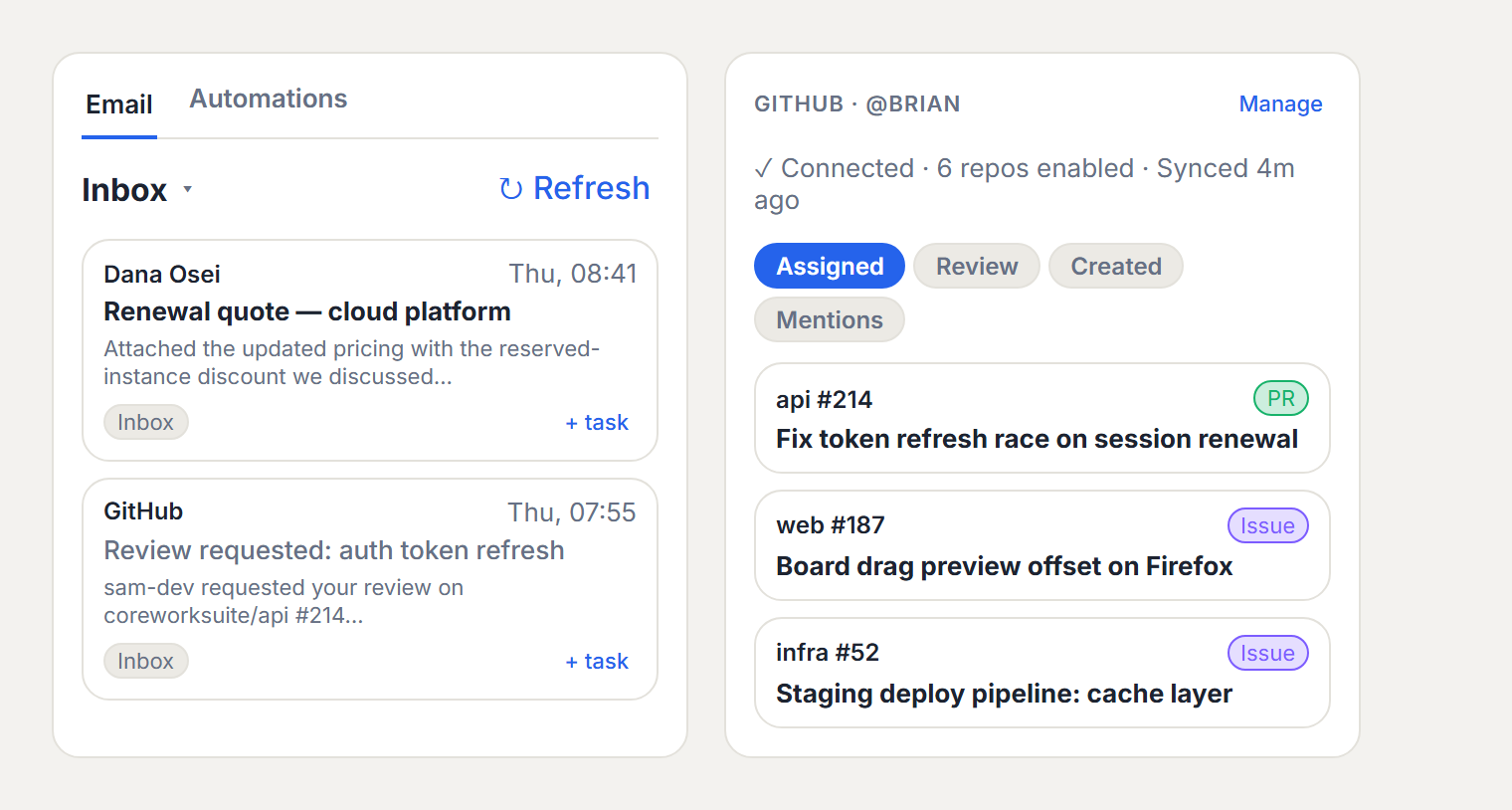
Gmail and GitHub panels inside CoreWorkSuite: inbox emails with a plus-task action, and assigned pull requests and issues ready to drag into the plan.
Reflect

End the day knowing what happened

An evening shutdown summarizes the day, detects accomplishments worth keeping, and rolls unfinished work forward. Insights show where time really went, week over week.

Reviews write themselves because the evidence was collected all along.
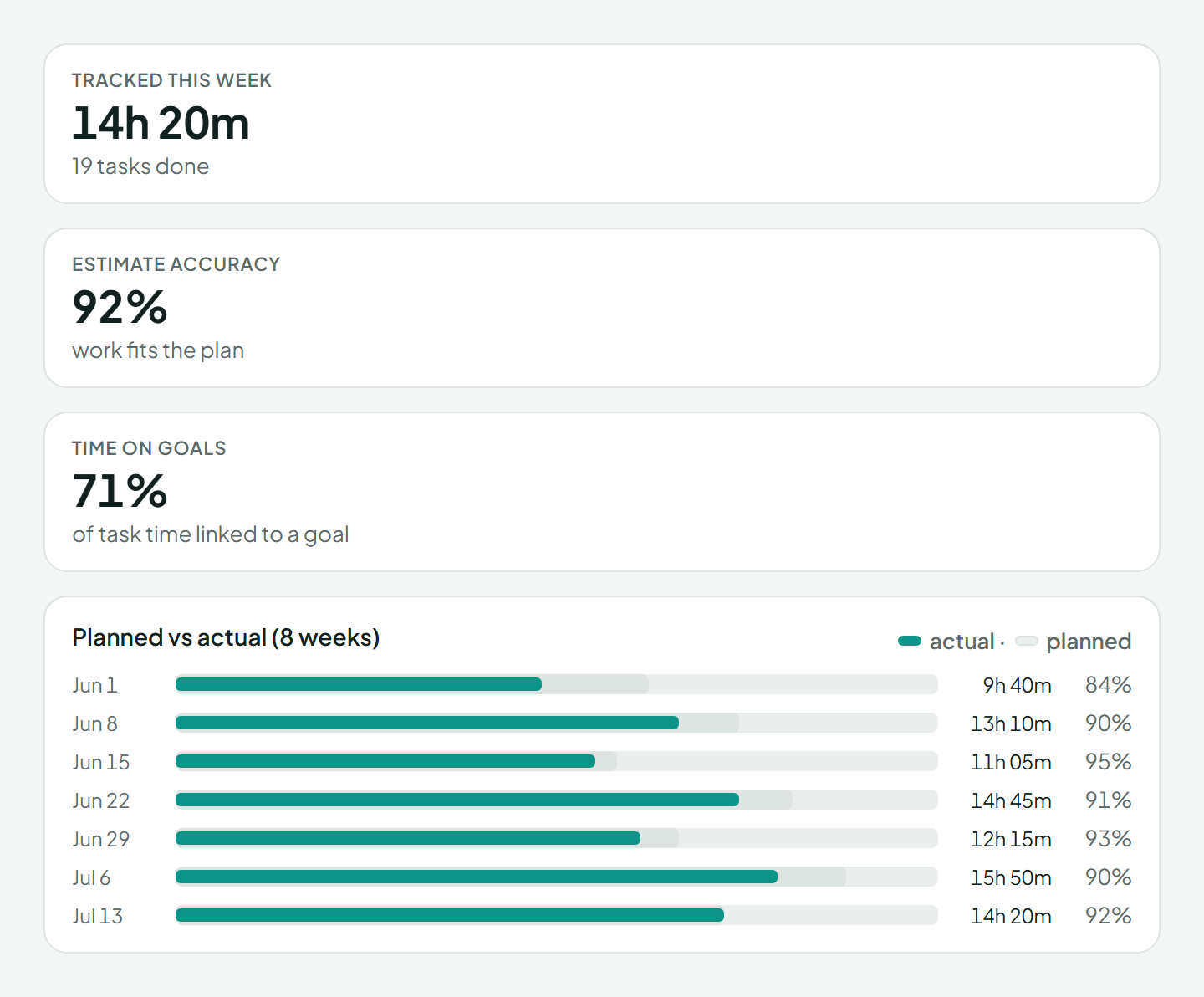
Insights: tracked hours this week, estimate accuracy of 92 percent, time on goals, and a planned versus actual chart across eight weeks.
The AI

Meet Companion.

The intelligence inside CoreWorkSuite. It works quietly in the background and speaks in one calm voice when it has something useful to say.

Prioritizes

Drafts each morning from your real workload and calendar.

Summarizes

Closes each day with what happened and what moves.

Reflects

Writes weekly retros from evidence, not memory.

Remembers

Finds notes by meaning and logs wins as they happen.

Plans

Time-boxes around meetings and your workload limit.

You stay in control. It keeps up.

Integrations

Native, not bolted on

Connected tools appear inside the workspace as first-class panels, with the same design language as everything else.

Gmail Starred email becomes a task
Google Calendar Plans respect your meetings
GitHub Issues and PRs into your day
Outlook Publish focus blocks to your calendar
ICS feeds Any published calendar URL
Get the app

Take it with you

The full workspace on your phone: capture on the go, glance at your day, and stay connected to Companion wherever you are.

Android

Direct download, available now.

Download APK v1.0 · ~9 MB · Android 7+

Google Play

Store submission is on the way.

Coming soon

App Store

iOS is planned; store submission is on the way.

Coming soon

Direct downloads need "install from unknown sources" enabled once, since the app isn't in a store yet - a normal step for early access.

Early access

Built in the open, used every day

CoreWorkSuite runs its maker's real workweek. Early access stories will appear here as they land, not before.

Your story hereEarly access testimonials appear when they are real. Nothing on this page is invented.
Your story hereUsing CoreWorkSuite for your workweek? We would love to hear how it changed your days.
Your story hereWrite to hello@coreworksuite.work after your first week.
4daily AI routines, on your schedule
5native integrations
1calm workspace
Pricing

Free while in early access

The whole product, no card required. Pricing arrives with maturity, and early users will be treated well.

Early access

$0

everything included

  • The full workspace: plan, focus, connect, reflect
  • Companion AI routines and chat
  • Gmail, GitHub, and calendar integrations
Start free

More on pricing

Questions

Fair questions, straight answers

What makes this different from a planner or task app?

A planner organizes today and a task app lists what exists. CoreWorkSuite adds the layers around them: goals the plan serves, notes and wins it produces, your email and code beside the plan, and an AI that drafts the morning, protects focus, closes the day, and writes the retro. It is an operating system for your work, not a single tool.

How does the AI actually help?

Four scheduled routines: a morning plan, an evening shutdown, daily highlights, and a weekly retro, each running at times you choose. Plus a chat companion that can act on your workspace, and quiet suggestions when something needs attention, like a goal due this week or a day planned past your limit. You approve everything; nothing applies itself.

How does the GitHub integration work?

A read-only GitHub App connection to the repositories you choose. Your assigned issues and pull requests appear beside the plan, ready to drag into a day, and pasting an issue link anywhere turns it into a linked task. CoreWorkSuite never reads file contents, diffs, or code.

How does the Gmail integration work?

Connect one or more accounts, triage the inbox from inside the workspace, and turn any email into a task with one click, or automatically by starring it. Archive, delete, and star actions sync back to Gmail.

Can I use my existing calendar?

Yes. Point CoreWorkSuite at any published calendar feed, including Outlook and Google Calendar ICS links. Your meetings overlay the planner so plans respect reality, and your focus blocks can publish back as a feed your calendar subscribes to, so meetings stop landing on top of deep work.

Finally. This is how work
should work.

One workspace. Clear priorities. Protected focus. Start in under a minute.